Tag Archives: technology - Page 10

Key Board

When I’m at work, there’s some desk items that cause some distraction.  It could be the stuffed creatures on the shelf, it could be the NERF guns or the NERF Super Soaker missile (“The F Bomb”).  But for some people, the thing that catches their attention is my keyboard.  It’s a new keyboard, but it doesn’t look new.  It’s old-school.  It’s actually impossible to find a decent picture of it online.  Even the manufacturer’s website doesn’t have a flattering photo of it.  It’s a KeyTronic.  It’s been my favorite keyboard brand for at least 15 years.  It hasn’t changed its look in 15 years, nor has it changed its feeling.

Yesterday, I purchased the newest model of KeyTronic’s keyboards and this weekend, I’ll have the chance to find out if they are remaining true to their roots.  There’s a couple things I can’t live without on this keyboard.  When I say I can’t live without them, I mean, I bought one for home and one for work.  The productivity loss when I change keyboard layouts is significant.  The KeyTronic keyboard is offered with a large L Enter key instead of the straight bar Enter key.  This makes the backspace half-sized and moves the backslash key up to the top row.  The other thing I can’t live without is the tactile snap of the keys.  Less important, but noticeable, is the huge chasm of empty space between keys.  This is a very forgiving keyboard to type on.  When you type code all day and in the evenings either code some more or blog, a good keyboard is required.  Yet another design feature you don’t see everywhere is what someone called the “stadium seating” of the keys.  When the top row of keys is nearly 50% higher than the lowest row, I find my thumb resting more naturally under my fingers to hit the space bar.

I was looking online to see if there were any other KeyTronic fans.  Outside of product reviews, there’s a couple of threads on a mechanical keyboard forum praising the feel of the KeyTronic, although also admitting it is not a mechanical.  So, besides that, I didn’t find much.  And what I read sort of inspired me to type a bit and remember why I liked this keyboard so much. 

In this day where flat keyboards are the standard, and chiclet keyboards are fashionable, it seems like typing is taking a back seat, which is consistent with the slow decline towards content consumption instead of content creation.  You need a keyboard to type a URL or a status update or maybe an email (so long…); you don’t need a task-oriented keyboard.  Gamers buy keyboards made for their needs.  I would like to believe that this keyboard grew up as a product optimized for the needs of the time, which required much more typing than the current age.  But now it’s become a keyboard made for my needs – extended typing sessions.

So now I’m waiting and hoping that I will have a new keyboard that has all the same great feeling of this one but has a look of “what kind of keyboard is that?” instead of “is that even a USB keyboard?”

Code

This is a good video.  In a way, it’s very surprising to me.  I had no idea there was a shortage of software developers, much less a shortage of that magnitude.  The people in the video made some pretty good points, but I think in some ways it overplayed some parts and missed some other parts.  Of course everyone’s story is going to be different, so this is mine.

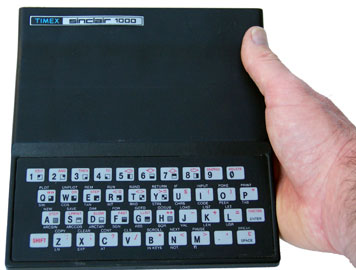
My first computer was a Timex Sinclair 1000.

image

This computer was a tiny device that plugged in to your TV and had a keyboard with multifunction keys.  The keys had upper case and lower case, and also could print out a graphic character.  But one of the biggest tricks it would do is spit out a whole BASIC command with a single keypress, when it was in context.

So one day, my dad brings home this Timex Sinclair and gives it to me.  He says it’s a computer.  I’ve always loved computers.  Back in 1st grade, in a workbook, there was a page with three futuristic views and you chose which one you felt was going to be the real future.  Unsurprisingly, I chose the one with the big computer banks and I wrote beneath it, “I like conputers (sic) and how they work.”

Since I was so awestruck by computers, I had this device hooked up in no time and immediately started using it.  The very first thing I did was type in my name, which was very difficult because each keypress would generate a BASIC command.  Laboriously, I typed in each character of my name, then backspaced over the command that was inserted.  Finally, I got my name entered and pressed Enter.

“Syntax Error”

I look up at my dad and say “What?  It doesn’t know my name?”

And my dad thrust the owners manual at me and said, “No, you have to read this.”

And so I did, starting with two-line programs that would fill the screen with graphic characters (10 PRINT “JHGJSFGJD”; 20 GOTO 10).  Then I remember the first time I struggled trying to figure out how I could fit two pages of code onto the tiny screen, thinking that if the program code scrolled off the top of the screen it would be lost.  Then I just started “doing it.”  Coding just became something I did.  And back then, if you wanted a computer to do something, you made the program yourself.

My take on being a coder, which isn’t one expressed in the video, is that it’s pretty close to being a god.  As a coder, you are creating things.  And not creating in the artist sense, because most all art is simply a static representation.  A coder creates something that does things.  Mechanical and electrical engineers should have the same feeling.  When you’re done with your work, you can release your creation and it lives on its own.  That’s pretty powerful.

The other thing about coding, and the one that always makes me tell everyone “I love being a programmer”, is that it makes your life so much easier.  If there is anything you do that is difficult, repetitive, or monotonous, you can write a program to do it for you.  Like a boss.  You can’t fully grasp how great of a feeling this is unless you’ve actually done it.  When you spend a hour a day doing a task, and you invest a couple of hours into writing a program, then you gain an hour back every day because that task is now automated, that’s the miracle of software.  And that’s the reason businesses need programmers.

The video doesn’t mention this, but software development has been one of the most resilient professions in recent times.  If you’re good, you should not have any issue finding a job.  Although the video overplays the supposed awesomeness of working at Facebook, Twitter, or Google, there are many great companies that love their IT departments and usually give them a break when it comes it corporate rigidity.  Although some people are after the money (i.e. recent post), you can still get a great income from doing something you love.  And when you love it as much as I do, it’s hardly considered work.

So, get yourself involved with coding, or get someone else coding.  Don’t see it as a chore, or a task, or as work.  View it as creating, as art, as play.  Create something tiny and say, “what if?”, then “what now?”

Finally, I understand.

Today I was out at lunch, eating at the bar and a commercial came on – Finally Fast!  Go to Finally Fast dot com for a free analysis!

This commercial has been around for a long time, and I’ve always known it to be just some sort of ridiculousness.  But I had a thought, what if I did actually run it… on a brand new OS installation?  Could Finally Fast make a brand new computer even faster?

So I set up a fresh fake email account because I know I’m going to have to register for this crap (turns out I didn’t need it).  And I created a clone of a new Windows 8 virtual machine.  Let’s go.

During install, I took a moment to actually read the license agreement.  It scared the hell out of me.  There was lot of text relating to payment, recurring billing, cancellation, and chargebacks.  For example, if you request cancellation of the service, they have 3 days to respond to your request.  If they don’t respond, it’s up to you to request again.  So if you wait until the last day to cancel your “subscription”, you might as well expect it to be too late and you’re going to get charged for another year.

If you try to cancel payment by calling your credit card and cancelling the charge, they will dispute the chargeback and will charge you $500 for “defrauding” them. If you intend to cancel payment through the credit card company, you have to provide Finally Fast with a police report showing that you reported your credit card stolen, since that’s the only acceptable reason for cancelling a charge this way.

If you couldn’t tell this was a scam from the start, and I’m not sure how you couldn’t, it should now be clearly obvious.  If a company threatens its potential customers, you do not want to do business with that company.

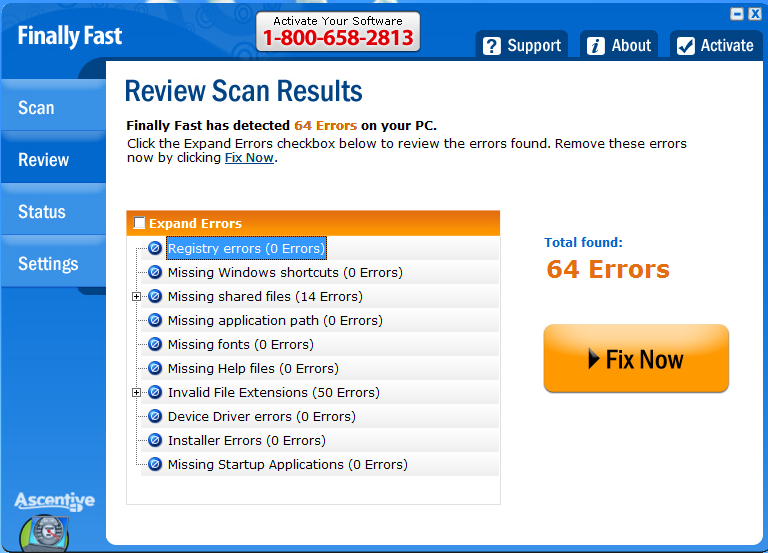
So here’s the results of my scan on a brand new install:

image

64 “Errors”.  Missing shared files (which happen to be all references to the obsolete .NET Framework 1.1) and invalid file extensions for file types that are hardly ever used, like .ARJ.  None of the “errors” are critical.  They won’t make my computer faster.  Clicking Fix Now does what you expect, it opens a web browser to make the sale.  The scan has been scheduled to run every 7 days, which I am confident will present the results and another request for activation.

At this point I’ve lost interest in the application.  You can download a bunch of other applications that do other scans and I wasn’t going there.  My curiosity was satisfied that a new OS install evidently has “errors” that must be fixed by buying an application from a company that expects you are going to defraud them.  And as we all know, what you believe will happen, will happen.

The Biggest and the Bloatedest III

It seems to be the natural progression of things to become so big and so complex that they just become useless.  Then new upstarts that are simple and lean take over, until they become huge and the cycle continues.

At my job, we use custom controls for our website and application.  Custom controls have always been a great thing for developers because they give you extra functionality built in, so you don’t have to code it.  Telerik controls have been leaders in this field.  But recently, there have been changes – breaking changes – in the newer versions.

I had a simple RadTextBox that I added a script to so that it would do a postback when there was 5 numbers in the textbox (a zip code).  Simple and easy:

if (((event.keyCode||event.which)!=9)&&((this.value.length==5)||(this.value.length==0))) setTimeout("pnlUpdate",300)

This suddenly stopped working.  Well, the postback would happen, but the RadTextBox’s value would be blank.  Telerik support suggested I handle the control’s KeyPress event:

function KeyPress(sender, args) {
    var textLength = sender.get_textBoxValue().length;
    if (textLength >= 5) {
        sender.set_autoPostBack(true);
        sender.set_value(sender.get_textBoxValue());
    }
}

This is stupid enough, that I have to use a custom event and custom methods to get and set the value of a textbox, but there was more that needed done.  The event fires on the key press, but the textbox value doesn’t include that key yet, so you have to include it yourself when measuring the length.  But you have to insert the new character in the right position for when you set the RadTextBox value.  Finally, when using the KeyPress event, the RadTextBox’s MaxLength isn’t enforced, so there has to be a check included for that. 

So from the Telerik proposed solution, I ended up with a script like:

function checkZipCode(s, e) {
    var t, l, c

    c = s.get_caretPosition();
    t = s.get_textBoxValue();
    t = t.substring(0, c) + e.get_keyCharacter() + t.substring(c);
    l = t.length;
   
    if (l > 5) {
        e.set_cancel();
        return
    }

    if (l == 5) {
        s.set_autoPostBack(true);
        s.set_value(t);
    }
}

This is totally unacceptable.  And all because Telerik decided to begin managing the control’s state independently, breaking the standard HTML input behavior.  It’s been growing over time that a developer using Telerik controls has to do things “the Telerik way” in order for the controls to work properly.  Where Telerik controls once were written as extensions to existing controls, they have become total replacements, with little resemblance to the original controls they look like.

So, it’s going to be my recommendation to reduce our dependence on Telerik controls.  I doubt we’ll be able to get rid of the RadGrid, which has its own universe of functionality and weirdness, but when DropDownLists  are rendered as <ul> and TextBoxes don’t use the standard Input Value property, there’s something really wrong about that.  It’s garbage like this that makes MVC so appealing.  Put it this way.  If the big argument against WebForms is that it is trying and failing to make a WinForms model work on the web, then Telerik is taking a WebForms app that is acting like a WinForms app and trying to make it act like an AJAX website.  At that point, you might as well not use WebForms.

Technology Can Do That, So Let’s Not

I wonder what technology is coming to and at the same time, I wonder if I’m just getting old.  I look at things that were normal for me at the peak of my programming days and wonder if older developers thought I was an idiot for doing things that way.  For example, did the old procedural programmers of old see object-oriented design as ridiculous, slow, and inefficient?  Maybe.  But OO programming is pretty much the standard now.

But for some reason, I am confused as to why implicit typecasting is suddenly “awesome".  We had that way back when in VB and Classic ASP and we were hated for it.  Then .NET came along and strong-typing became the thing to do.  Now we’re back to implicit typecasting and scripted languages just like we had with ASP.

But the thing that’s really got me confused is cloud computing, why everyone thinks it great to rely on someone else instead of relying on yourself.  I guess the argument is “they can do it so much better than we can, so why not let them.”  There’s no more building yourself up?  You have to start at the top?  Talk about immediate gratification.  That’s bitter old man talk, there.

At my job, a co-worker (thankfully not me) has an integration project using Amazon Web Services (AWS).  As best I can tell, it’s a web service that sits in front of a message queue system.  To be slightly vague about the project, our client sends us a request with a questionnaire.  We collect the responses to the questions and send each individual answer back to the client as a message via AWS.  This infrastructure was forced on us; not our choice.  So, my old-timey brain is thinking, “why must a unit of work (a completed questionnaire), be transmitted in discrete pieces when it needs to be a single unit on their end?”  The answer to this is “don’t worry about it.”  The reason is a new crazy programming concept: eventual consistency.  Apparently our client is so hip and modern, they are using both “the cloud” and “eventual consistency” in their application design.

Eventual Consistency is nothing new.  Airlines have been using it forever.  Did you lose your luggage?  Is it now five states away?  It will eventually get to you and everything will be fine.  FedEx started using it with SmartPost.  If you ever had something shipped via SmartPost, you could watch the package get shipped all over the country, but eventually it would get to you.  With every real-world application of Eventual Consistency, you are guaranteed to get what you want, but never sure when it will happen.  Why, in any case, this became an acceptable solution is beyond me.

To wrap this up, but to leave it with some final, head-shaking, “why is this acceptable” thoughts, here’s some of the documented guidelines when using Amazon Web Services:

  • When you make a request for new messages, you may only request up to 10 new messages at a time.
  • If you request 10 messages, you may not get 10.  You may get less than 10, even if there are more than 10 messages in the queue.
  • If there are a very small number of messages in the queue, you may get zero.
  • Despite the inability for AWS to deliver the messages you request when you request them, all of the messages are available for viewing through their control panel.
  • When you send a message, you get no acknowledgement that it was sent successfully.  If you did not get an error during sending, you assume it was sent successfully.
  • You have no idea if the message was delivered to the destination queue successfully.  You will only know when the receiver picks up the message, and that is send as an acknowledgement on another queue.  You must query that queue and match up the acknowledgements with your initial sent messages.
  • The acknowledgement queue has all the limitations of the aforementioned message requests.

This is true progress.

Window Pains

It doesn’t seem that long ago that I was posting about how my computer had frozen during startup and I ended up buying, effectively, a whole new computer.  After returning from a week-long vacation, I found my new computer frozen again at the exact same place.

This time I spent a bit longer trying to get the computer to work, because I had just gotten everything installed and set up the way I wanted it.  I booted to Ubuntu and checked the hard drive – no problems at all.  I did the “automatic repair” multiple times until it told me it couldn’t fix the problem. 

Finally I booted up the Windows 8 media and looked at the repair options.  None were satisfactory.  The closest thing I could find was an option like “Refresh this PC”, which would replace all the Windows files (which I wanted), but would wipe out all installed programs (which I did not want).

With a heavy heart, I made the decision to reformat and reinstall… Windows 7.  In the span of a couple months, I’ve had two Windows 8 installations on two different computers that have been unrecoverable.  The worst part for me is the lack of recovery features, namely, Safe Mode.  If I could only get to a goddamn desktop and look at the event logs to see what happened leading up to the failure, I could troubleshoot it.  Whoever eliminated these diagnostic options out of fear that they would confuse or intimidate novice users is an idiot.

In the previous failure, I had put the blame on hard drive errors, but it was a convenient excuse.  I didn’t really believe it.  I now suspect in both of these cases, it was the Automatic Update process.  I have always had my Windows Update settings where it would download the updates, but I would install and restart the updates when I chose to.  With Windows 8, I decided to let the system do what it felt was best, meaning restart whenever needed.

So I guess I’m going to have to run Windows 8 in a virtual machine, if I even find I have a need for it.

It’s Just Money

Why is this conversion to Quicken so goddamn hard?  I think I’m a reasonably smart person, so why does my money keep getting screwed up in Quicken?

Whenever I use Quicken, it’s laborious.  And not because it’s different, I’ve come to learn the differences in the 4 months I’ve been using it.  It’s dumb.  And I pity the people that have been using for years and years, because MS Money had a much better user interface.

My latest fiasco occurred this morning when I got a notice from a bank saying a transfer was cancelled due to insufficient funds.  After confirming that the balance in Quicken differed from the bank web site, and after a short walk to calm the hell down, I discovered that I had six deposit entries in my register that were duplicates of downloaded transactions.  Thankfully, this was a simple transfer between savings accounts and had no effect on any bills.  Of course, it uncertain if I will be whacked with an overdraft fee or not.

The problem is, I can’t trust Quicken worth a shit.  This situation arose even after reconciling the ledger of the funding account.  Should I have been suspicious that I had unmatched transactions in my register?  Yes, but it has happened so often in my short time with Quicken, I’ve taken it to be normal.  And just now when I was downloading transactions, I had a transaction mismatched and I couldn’t find the real transaction it belonged to.  Why?  because the last time I downloaded, I thought I would trust Quicken and chose “Accept All” to auto-match all the downloaded transactions.

As far as laborious, the matching process is the worst.  The downloaded transactions are in a list at the bottom and as you select each one, it highlights the matched transaction in the register above.  So your eyes are constantly scanning up and down.  Payee?  Good.  Date? Good. Amount? Good.  Ok, next.  Three checks for every downloaded transaction.  And as I’ve found, you have to check all three, especially if you frequent a business often.

The bill payment is very confusing.  The idea that you can pay a bill in Quicken, but that it doesn’t really get paid until you update your accounts is dumb.  And I certainly got misled by “One Step Update”, which I thought would make an immediate payment, but instead merges payments and transaction downloads together.  You mean there’s an even dumber way to handle online payments in Quicken?

I haven’t even dared to test out the reporting and projection tools.  I’m actually scared.  Not that anything would get messed up, since you can’t change anything when running a report, but I think I’m scared at how disappointed I will be or at how confused I will get looking at the results.

This has been one problem after another.  I spoke to a co-worker one time about a business application we use and she commented on how stupid she felt after training because none of it made any sense to her.  It was because the program is so un-intuitive, it made her have to think differently about everything she wanted to do.  That is how I feel and I do not think it is my fault.

The Biggest and the Bloatedest

My personal domain name is up for renewal.  I’ve been with Network Solutions as my registrar for a very long time, 15 years, maybe.  A whole lot of low-cost registrars have popped up during that time, but I always stuck with the leader.

Now, recent re-evaluation shows I don’t really have a need for any of the services NetSol offers, so why should I be paying a premium price for their services?  Let’s take a look and see what the cost of renewal is with NetSol.  I just want to renew my domain.

This is where NetSol has really shot itself in the foot.  Not only is it a premium-priced registrar, it seems they are so money-hungry, they want to take every attempt to get more out of you.  After clicking renew, I am taken to a series of advertisements about other things I should be buying.

First, a pitch to add additional domains.  These are variations on my existing domain.  No, I don’t see any need to have three more domains with less-recognizable suffixes (or TLD’s for the technical). No thank you; next.

Next, a pitch to make my registration details private ($9/yr).  Other people have complained about this before.  Why should I have to pay extra for privacy?  And had I bought extra domains, multiply that $9 per domain.  Next!

Next, a pitch for web hosting.  New domains, hmmm. ok.  Existing domains, you probably already have hosting.  If you were transferring a domain, that would be another valid opportunity.  But, no.  I’m fine where I’m at.

Next, a pitch for forwarding web requests, mail hosting, custom website design (even if you selected no web hosting), and an SSL certificate.  Jesus, isn’t this simple renewal request ever going to end?  This is four full pages of advertising! 

Then, finally, you get to see the price of renewal: $35/yr.  4x the amount of other registrars?  For what?  4 pages of ads when you renew?  Now, you can see that NetSol has been overtaken by salespeople and scammers.  Granted, there are discounts for multi-year renewals, which is how I’ve stayed with NetSol as long as I have.

The way I see it, when you click renew, you should be taken straight to the shopping cart where a line item shows the domain(s) for renewal.  Under the line items, a line with a checkbox for each of these offered services should be shown.  Clicking the checkbox would expand the section to let you choose which renewing domains will get the service.  Obviously a “Learn more about service” link would be provided.

That’s quick, simple and to the point.  One page, all options available.  Instead, NetSol is afraid that if they don’t shout the features and prices at you in a full page ad, you might not take them up on their overpriced services.  In the virtual world as well as the real world, overselling, overhyping, and shouting drives me out the door.

Farewell, Network Solutions.

The Quickening

So I’m at the 7th and final stage of grieving: acceptance.  I have accepted that Microsoft Money is gone and will not be coming back, so I must move to Quicken.  It’s not without trepidation that I purchase Quicken and try to recapture the enjoyment of tracking my finances with a new program.  I had used Quicken a long time ago and was not as pleased as I was with MS Money, which is probably why I’ve used Money for over 10 years.

So I’ve gotten Quicken Deluxe 2010 installed and the first thing that pisses me off is that it has put icons on my desktop.  Not just one icon, which is tolerable, but 4.  One for the application and three sales pitches.  This is a terrible first impression.  One shortcut is to a co-branded version of FreeCreditReport dot COM – one of the biggest scams out there.  One is for their BillPay service, at $10/mo.  Even Wachovia, a premier bank, only charges $6/mo for integrated BillPay.  Unless Quicken doesn’t have 2-way integration with Wachovia, which is practically a dealbreaker for me.  MS Money had it. (Turns out, yes, Quicken does support online payments through Wachovia)  The final offer is for a typical rewards credit card provided by Chase.

First Launch: I am prompted to “Get Started”.  I have to enter my banks and their login info so Quicken can download transactions and whatnot.  I’m mildly impressed.  In MS Money, this was a separate step after setting up accounts.  It picks up my Wachovia account without a problem.  Then I do my Chase account.  Oops, there was a problem.  It says to try again later.  So I think, “Maybe it should be entered as a WaMu account, since that’s where it was originally opened.”  Nope.  Not found there.  It’s later now, so I try again under Chase.  Quicken crashes.  Ok, my impression of this program is sinking fast.

Second Launch: I get all of my accounts set up.  And I am quite impressed with how well it handled ALL of my accounts.  If I had a login for it, Quicken handled it.  I got my loans entered and the wizard was pretty easy to work through.  I browse through the preferences and set a few things to my liking, like two-line registers.  Now, I am downloading transactions for an account that doesn’t have real-time transaction updates.  And it’s frozen.  However, I was able to close the window (X) and it seemed to be a successful update.  We’ll see how that turns out on the others… ok, three of the four I had to close the window, but they seem current.  Not sure of this is going to be an annoyance or it’s just a fluke.

I’m going to give it an honest try, since I have no other choice, really.  I’ve tried GnuCash and that was definitely a step down.  So we’ll see how quick things get.

What Is This? A New Post?

You’ve got to be kidding me.  What’s the occasion for this?  Which freaking song are you still working on?

Well, the impetus for the post is the simplicity of Windows Live Writer.  Having a nice WYSIWYG editor makes for less resistance to creating a new entry.  But there’s other minor things that happened in the last year and a half that might be mentionable as well.

Currently the recording system is running Vista x64.  This was a trial run on 64-bit to see if I could still get by, which I certainly can.  Well, except that the CME UF6 doesn’t have a USB driver for Vista (except through a user patch), and no 64-bit driver at all.  So, although I never used the USB functions of the controller, it seems I never will, either.

I’m anxiously awaiting the arrival of Windows 7, at which time I’ll rebuild the system for recording again.  The system has no music software on it yet.  I’ll also invest in a nice hard drive or two for performance and volume, although I don’t expect to do much physical recording, instead sticking to MIDI and VST, having the HD space is never a bad thing.

So, you know I have been working on this song…  as the joke goes, “When’s your album coming out?” I’ve been playing the same songs for over a year.  They haven’t been completed, but I expect when I get the new recording setup, I’ll be ready to put some tracks down and get some momentum.  The plan is still the same, to do another CDD-type release – that is, non-sequence-based, more live-oriented.

Otherwise, musically, there’s not much to say.  Well, my Mackie mixer has been powered on and running 24×7 for at least 5 years and my Event monitors have been doing the same for at least 2.  That makes these devices a great testament to longevity , durability, and ecological irresponsibility.