Tag Archives: hobbies - Page 11

Key Board

When I’m at work, there’s some desk items that cause some distraction.  It could be the stuffed creatures on the shelf, it could be the NERF guns or the NERF Super Soaker missile (“The F Bomb”).  But for some people, the thing that catches their attention is my keyboard.  It’s a new keyboard, but it doesn’t look new.  It’s old-school.  It’s actually impossible to find a decent picture of it online.  Even the manufacturer’s website doesn’t have a flattering photo of it.  It’s a KeyTronic.  It’s been my favorite keyboard brand for at least 15 years.  It hasn’t changed its look in 15 years, nor has it changed its feeling.

Yesterday, I purchased the newest model of KeyTronic’s keyboards and this weekend, I’ll have the chance to find out if they are remaining true to their roots.  There’s a couple things I can’t live without on this keyboard.  When I say I can’t live without them, I mean, I bought one for home and one for work.  The productivity loss when I change keyboard layouts is significant.  The KeyTronic keyboard is offered with a large L Enter key instead of the straight bar Enter key.  This makes the backspace half-sized and moves the backslash key up to the top row.  The other thing I can’t live without is the tactile snap of the keys.  Less important, but noticeable, is the huge chasm of empty space between keys.  This is a very forgiving keyboard to type on.  When you type code all day and in the evenings either code some more or blog, a good keyboard is required.  Yet another design feature you don’t see everywhere is what someone called the “stadium seating” of the keys.  When the top row of keys is nearly 50% higher than the lowest row, I find my thumb resting more naturally under my fingers to hit the space bar.

I was looking online to see if there were any other KeyTronic fans.  Outside of product reviews, there’s a couple of threads on a mechanical keyboard forum praising the feel of the KeyTronic, although also admitting it is not a mechanical.  So, besides that, I didn’t find much.  And what I read sort of inspired me to type a bit and remember why I liked this keyboard so much. 

In this day where flat keyboards are the standard, and chiclet keyboards are fashionable, it seems like typing is taking a back seat, which is consistent with the slow decline towards content consumption instead of content creation.  You need a keyboard to type a URL or a status update or maybe an email (so long…); you don’t need a task-oriented keyboard.  Gamers buy keyboards made for their needs.  I would like to believe that this keyboard grew up as a product optimized for the needs of the time, which required much more typing than the current age.  But now it’s become a keyboard made for my needs – extended typing sessions.

So now I’m waiting and hoping that I will have a new keyboard that has all the same great feeling of this one but has a look of “what kind of keyboard is that?” instead of “is that even a USB keyboard?”
To Bed To Rise

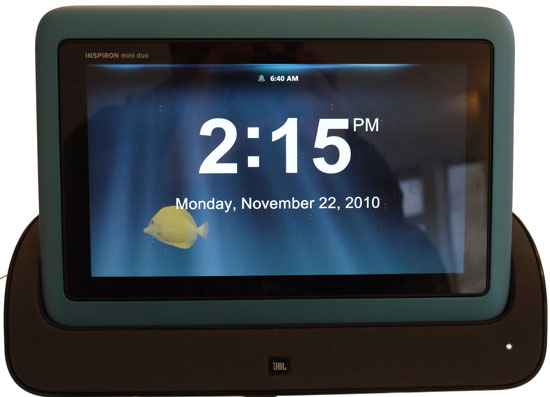
When Windows 8 came out, I had planned on making a Windows Store app that would be an alarm clock with sound soother for falling asleep.  Hardly a new idea.  In fact, I was driven more by personal need than personal gain.  I have the Dell Inspiron Duo.  The original one, with the JBL audio dock.  It’s possibly the best-designed multifunction consumer device. The custom dock triggers an app that can be used as a slideshow (like on an office or counter, replacing a digital photo frame), or as an alarm clock (best kept bedside).  The point is, when you’re not using it as a laptop or tablet, you’re using it as something else.

Well, you may know that this product got justifiably poor reviews because of its weight/battery life ratio and isn’t in production or even in warranty anymore.  Regardless, I own one and I have two docks, one at home and one at work.  One day I decided to upgrade to Windows 8 and the clock app wouldn’t launch anymore.  This was heartbreaking for me.  And until a recent explosion of programming motivation, I just used the dock as a charging station.

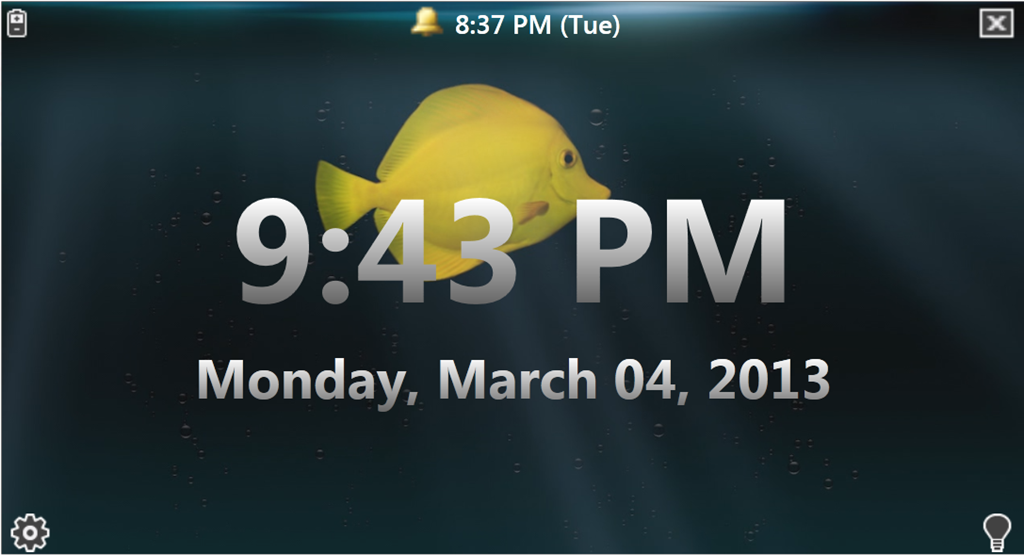
But tonight is the first live run of my replacement app for the Inspiron Duo “DockClock” or “DuoStage” or whatever they called it.  I’m pleased that I was able to come up with a technique for detecting when the laptop was docked as well as discovering the method for putting the screen to sleep on command.  The rest, involving background sounds, alarm timing, and background animation was easy work.

The original:

image

My prototype, with corner controls displayed:

image

My main regret is that I waited so long to write this app, since there’s a lot of Duo owners out there that have probably lost their capability to use the alarm clock in their docks.  But once I’ve given it sufficient personal testing, I’ll put it out there for download.

Oh, and as a passing mention, it appears I’m in my fifth year of posting on this blog.  I sure didn’t expect that.  There’s a lot of history in here, with some really low points in my life. Despite that, I’d have to say that the present is truly a high point of my life.  Will there be another five years?  Who knows?

Killing Creativity

I am getting so old.

The pieces are finally coming together to allow me to start recording again.  Windows 7: check.  New Cubase 5: check.  Now we’re ready to configure the recording setup.

Using an Emu 0404 as input, I have two mono inputs for my use.  Outboard, I have a Mackie 1642 that will do mixing duties for traditional gear.  It has 4 mono busses, so I routed two of them to the 0404’s inputs.  That will let me selectively choose what inputs I want to record.  Aside from having a cable plugged into the wrong port in the back, it was a snap.  The physical is simple.  The virtual is a little unknown to me, which is where I felt old.

The request I wanted seemed simple: I did not want to monitor the input.  If I wanted to monitor the input, I would do it through Cubase, which would send it to the main output.  Obviously I want to monitor the main output.  Reading through documentation (ugh), I found some diagrams that seemed to explain what needed to be done.  The 0404 talks to the input and the speakers through physical connections.  Cubase talks to the 0404 (not the input and not the speakers) through virtual connections – ASIO connections.

So after a good hour of tweaking, I got the routing correct and working.  Then, just to prove to myself that I understood what was going on, I reset everything to defaults and started over.  But after resetting everything, it worked without any tweaks.  So now I don’t even know what to think.

Bottom line is, I’m not doing anything musical tonight.  No wonder those that can afford studio time just do it.